Plain-English chat
Type what you want. HISAB reads the active sheet, understands your intent, and proposes the action. No formulas to memorise, no scripting to learn. Use the built-in engine or bring your own AI — no markup.
Features
Four pillars — AI, Python, ERP and audit controls — plus an automation layer for macros and ribbons, and a hands-free voice advisor you can talk to. Each feature is designed against a specific task accountants do every week, not built to impress on a stage.
Pillar 1 · AI-driven
Type what you want. HISAB reads the active sheet, understands your intent, and proposes the action. No formulas to memorise, no scripting to learn. Use the built-in engine or bring your own AI — no markup.
HISAB sees the structure of your workbook — sheet names, headers, sample rows — so the AI can refer to "the bank statement" or "column G" naturally.
Pre-built routines for common workflows: bank reconciliation, accrual booking, variance analysis, audit sampling. Use one, modify one, or write your own.
Pillar 2 · Python-powered
pandas, numpy, openpyxl, plotly, reportlab, and 40+ pre-installed packages. Runs in an isolated CPython process — no permission to touch your filesystem outside the workbook.
Python reads ranges, writes ranges, formats cells, creates pivot tables. No CSV round-trips, no copy-paste. The AI writes the code; you watch the cells change.
Every Python execution is journaled with inputs, outputs, and code. Re-run the same analysis next month with one click — or fork it for a variant.
Create dynamic Python scripts that run locally to clean exports, process folders, refresh workpapers, and regenerate reports without internet access.
Turn a month-end routine into a reproducible pipeline: load files, transform data, validate checks, and output the same report pack every period.
Capture script version, inputs, generated files, exceptions, and outputs so recurring automation stays reviewable and audit-ready.
Pillar 3 · ERP-native
Odoo, Xero, QuickBooks Online, Zoho Books, FreshBooks, and generic OData/REST. OAuth and API-key auth, refresh tokens handled automatically.
Trial balance, GL detail, AR/AP ageing, inventory, journal entries, COA. Filter by period, account, dimension. Lands as a clean table in your sheet.
Draft journal entries in Excel, review them in the approvals queue, post to your ERP with one click. Every push is logged, reversible, and auditable. See ERP reconciliation with write-back.
Pillar 4 · Audit-grade
ERP credentials, API keys, and OAuth refresh tokens are encrypted with Windows DPAPI tied to your user account. They cannot leave your machine.
Every cell HISAB writes is recorded: who, when, what was there before, what's there now, which AI turn triggered it. Export to CSV for auditor review.
Configure which actions need explicit approval — pushing to ERP, deleting rows, running macros, anything. The AI proposes, you decide. More on approvals, audit log & rollback.
HISAB caches workbook context locally. Your sheets stay on your machine — the AI only reads what your request needs.
Run HISAB in Ask-only (read-only), Plan (proposes a plan you approve first), Action (executes directly), or Automate (hands-off recurring routines). Every write is logged in all modes. Switch in one click.
Generate a per-period activity report for auditors: all chat turns, all writes, all approvals, all ERP pulls — with timestamps and user IDs.
Automation layer · Macros + ribbons
Describe the workflow in plain English. HISAB drafts the VBA macro, explains the code, and lets you review before anything is saved.
Create Excel ribbon commands for monthly close routines, reconciliations, imports, formatting, and report packs.
Macros and ribbon actions can require approval, be logged in the audit trail, and be shared through team skills.
Data layer · Power Query + drill-down
Describe the import — a folder of monthly files, two lists to match, a wide report to reshape — and HISAB writes the Power Query and loads a refreshable table. More on combining Excel files with AI Power Query.
The query lives in the workbook. Drop next month's files in the folder and click Refresh — the same clean-and-combine re-runs in seconds, every period, with identical output.
Double-click a figure in a report and the transactions behind it expand inline; double-click to collapse. Works on formulas and live ERP data. More on drill-down in Excel.
Voice layer · Sahib & Sahiba
Tap the mic and speak your request — "reconcile the bank tab", "explain row 14". HISAB transcribes it straight into the chat, so you can work hands-free while reading the numbers. More on voice-controlled Excel.
A spoken advisor that answers back. Choose Sahib (male) or Sahiba (female) — it keeps light memory of your work, greets you back, and stays in context across sessions.
Premium neural voices through your own OpenAI or Google Cloud key — ChatGPT-quality, or 1M characters/month free on Google. No key? The built-in Windows voice works offline, at no cost.
Architecture
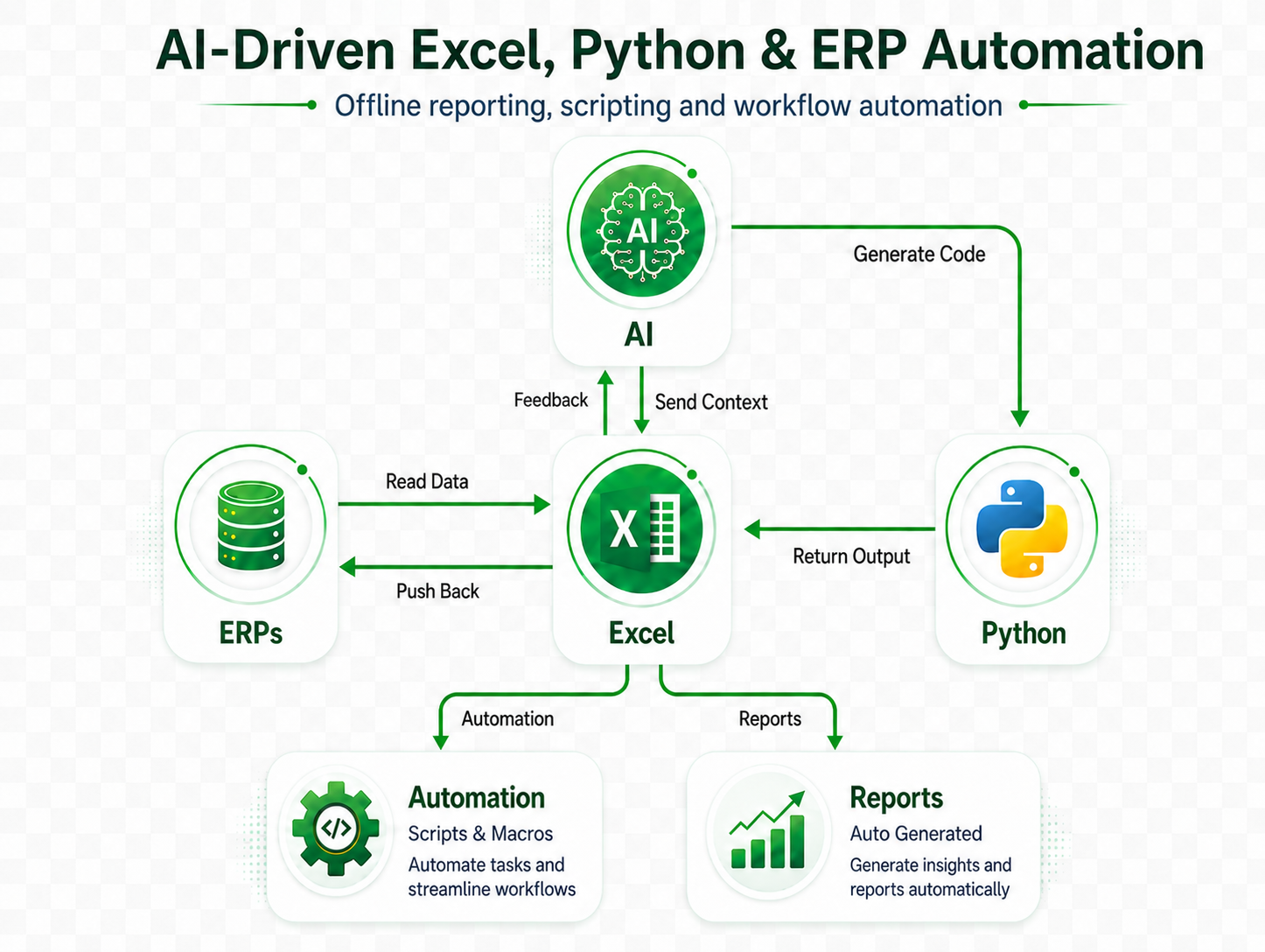
The AI talks to Excel through HISAB's local MCP server. Python and ERP connectors plug in alongside. Your data flows in the directions you'd expect — and only when you ask.
Explore
Five-minute install. 15-day free trial with 50 HISAB AI credits. No credit card.
Start free trial