Accounting in Excel: What It Can Do, the Controls It Lacks, and When to Move to QuickBooks, Xero or Zoho Books
Tested in Excel. On 24 October 2026 we asked HISAB 360 to build every Excel example in this guide for a sample company, in Excel for Microsoft 365 on Windows: the journal and its balance check, the trial balance, customer balances, the invoice register with ageing and a PivotTable, and the cash book. We recomputed every balance separately; they match. We also re-checked each outside source linked below on the same day. The screenshots are from that workbook (select one to see it full size), and you can download it.
Accounting in Excel works for a small, simple business: a cash book, sales and purchase ledgers, a trial balance, invoices and a basic bank reconciliation can all live in one workbook. What Excel cannot give you are the controls: an audit trail, locked periods, safe multi-user entry, bank feeds and direct tax filing. This guide shows how to set up the workable version properly, where it breaks, and how to keep Excel for analysis once a real ledger holds the books.
Sources last checked: 24 October 2026. We make HISAB 360, an AI assistant inside Windows desktop Excel that connects to accounting systems, so it comes last, with its limits.
Can Excel be used as accounting software?
Excel can keep the books for a small, simple business, but it is not accounting software. It will add up whatever you type, balanced or not, and keeps no dependable record of who changed a number last March.
- Excel is usually enough for a sole trader or very small business with one person keeping the books, a modest number of transactions, no staff, no stock and simple tax filing.
- You need accounting software once several people enter transactions, you want bank feeds, periods must stay closed, or you file under Making Tax Digital and would rather submit straight from your records than through bridging software.
- Most finance teams end up with both: QuickBooks Online, Xero or Zoho Books holds the ledger, and Excel does the reporting, reconciliations and analysis.
How to set up bookkeeping in Excel for a small business
Accounting in Excel holds together only if you follow one rule: enter each transaction once, in one table, and build every report from that table with formulas. Separately typed sheets drift apart within weeks.
Choose one of two designs.
| Design | How it works | Good for | Limits |
|---|---|---|---|
| Single-entry cash book | One row per receipt or payment: date, description, category, money in, money out | Sole traders and landlords who mainly need income and expenses by category | No balance sheet, no debtors or creditors, no trial balance |
| Double-entry journal | One row per debit or credit line, coded to a chart of accounts; every entry nets to zero | Small companies, anyone who needs a trial balance, balance sheet or aged debtors | More set-up, and Excel will not force entries to balance; your checks must |
1. A chart of accounts and a journal table
Put the chart of accounts on its own sheet (code, name, and type: Asset, Liability, Equity, Income or Expense). On a second sheet, create an Excel table (Insert > Table) named tblJournal with these columns: Date, Ref, Account, Contact, Description, Debit, Credit, TaxCode and Source (the invoice or receipt number).
Add a drop-down on Account that lists only valid codes (Data > Data Validation > List), so nobody can post to an account that does not exist. If several people will key entries, a form is safer than typing into the table directly; see how to create a data entry form in Excel.
Then add a balance check column to the table. Each reference (one journal, invoice or payment) must net to zero:
=ROUND(SUMIFS([Debit],[Ref],[@Ref])-SUMIFS([Credit],[Ref],[@Ref]),2)ROUND stops tiny decimal remainders flagging a balanced entry. Any row not showing 0 belongs to an unbalanced entry: add a conditional formatting rule that turns rows red when this column is <>0, and do not close a month while any remain (conditional formatting formulas need normal cell references, for example =$J2<>0 if the check is in column J).
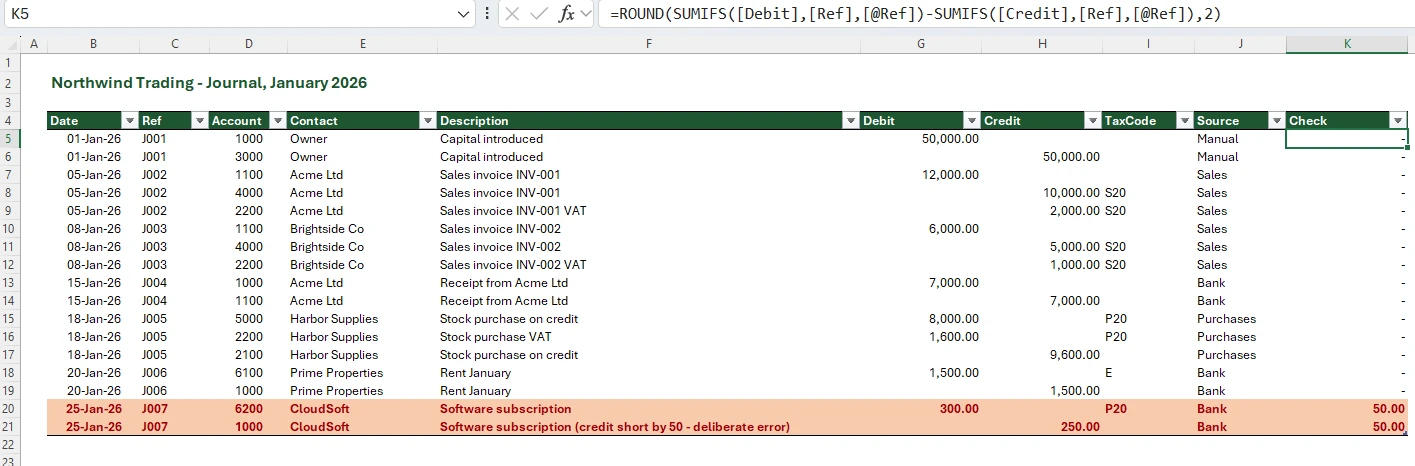
Protect the workbook from the start: lock formula columns, save a dated backup after each session, and start each financial year in a new file with opening balances brought forward.
2. An Excel cash book
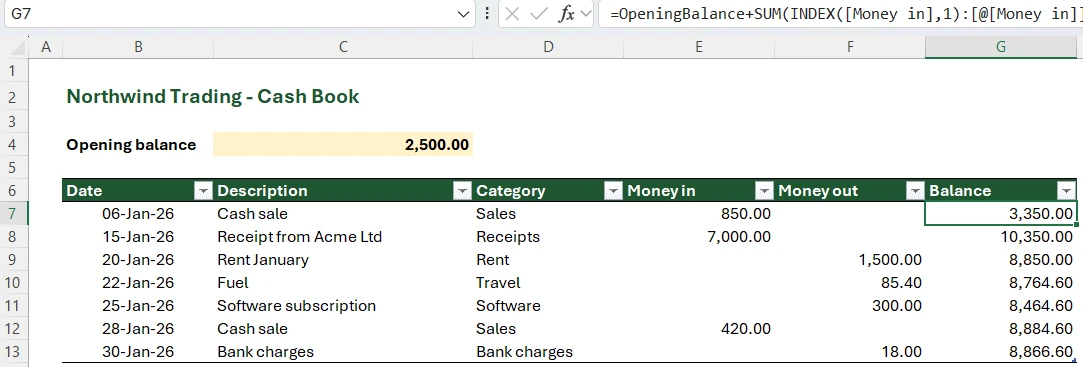
In a double-entry workbook, the cash book is every line posted to your bank account code: filter tblJournal on that code. In a single-entry cash book, give the table a running balance column. It adds all rows up to the current one, plus an opening balance in a cell named OpeningBalance:
=OpeningBalance+SUM(INDEX([Money in],1):[@[Money in]])-SUM(INDEX([Money out],1):[@[Money out]])Keep rows in date order; the running balance follows row order, not dates.
3. Sales and purchase ledgers
The sales ledger (debtors) is the set of customer balances inside your trade debtors control account. With a Contact column in the journal, one formula gives each customer's balance. Here 1100 is the debtors control account and A2 holds the customer name:
=SUMIFS(tblJournal[Debit],tblJournal[Account],1100,tblJournal[Contact],$A2)-SUMIFS(tblJournal[Credit],tblJournal[Account],1100,tblJournal[Contact],$A2)Customer balances must add up to account 1100; if not, a line was posted without a contact or with a misspelt one. The purchase ledger works the same way on the creditors control account, signs reversed.
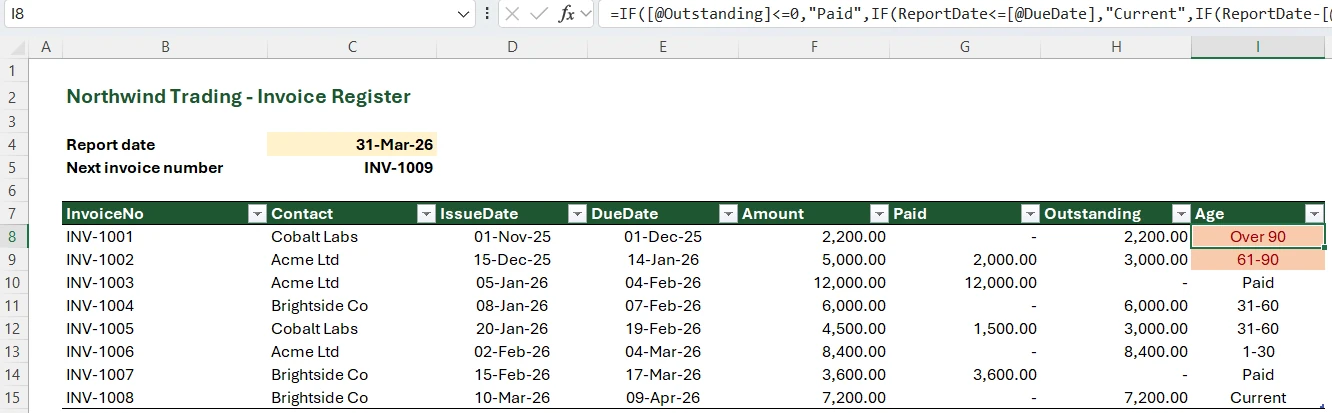
For aged debtors, keep an invoice register table named tblInvoices with InvoiceNo, Contact, DueDate and Outstanding columns, put a report date in a cell named ReportDate, then bucket each invoice:
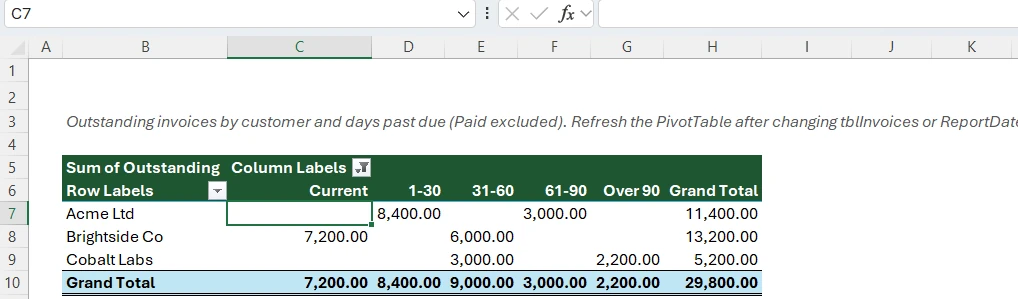
=IF([@Outstanding]=0,"Paid",IF(ReportDate<=[@DueDate],"Current",IF(ReportDate-[@DueDate]<=30,"1-30",IF(ReportDate-[@DueDate]<=60,"31-60",IF(ReportDate-[@DueDate]<=90,"61-90","Over 90")))))A PivotTable on that column, with customers as rows, gives you an aged debtors report. Drag the column headings into age order (Current, 1-30, 31-60, 61-90, Over 90) once; the PivotTable keeps that order when refreshed. Filter out Paid in the PivotTable, and set ReportDate to today: Outstanding is the current balance, so an older report date will not give historical ageing.
4. The trial balance
On a Trial Balance sheet, list every account code in column A and its name in column B, and put the period-end date in a cell named TBDate. In column C, the net balance for each account is:
=SUMIFS(tblJournal[Debit],tblJournal[Account],$A2,tblJournal[Date],"<="&TBDate)-SUMIFS(tblJournal[Credit],tblJournal[Account],$A2,tblJournal[Date],"<="&TBDate)Split it into a debit column D with =MAX(C2,0) and a credit column E with =MAX(-C2,0), total both, and add a check cell below the totals (for example =ROUND(SUM(D2:D200)-SUM(E2:E200),2)=0). If it says FALSE, the balance check column above will show you where.
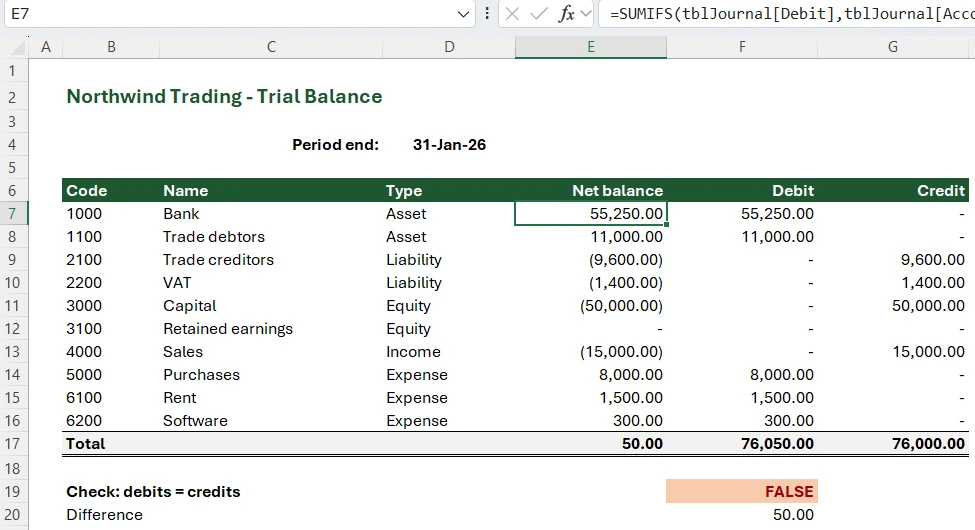
One catch: a cumulative trial balance keeps adding income and expenses year after year. At each year end you need a closing journal that moves the year's profit into retained earnings, or income and expense formulas that only sum dates within the financial year. From the trial balance you can build a balance sheet with a built-in balance check (free template).
5. Invoices
Microsoft's accounting templates include several invoice designs. Pair the template with the tblInvoices register and take the next number from it (=MAX(tblInvoices[InvoiceNo])+1) so numbers stay sequential. Keep InvoiceNo as a plain number and add any prefix with a number format. Once an invoice is issued, record its number as a value so it cannot change when the next row is added, and save the invoice as a PDF.
6. A simple bank reconciliation
Export the bank statement to CSV, paste it next to your cash book lines, and match on amount and date. Our free bank reconciliation template does the matching with COUNTIFS on amount; a deposit that covers several invoices still needs a person to match it.
Free accounting software in Excel: what the downloads actually are
Most "free accounting software in Excel" downloads are workbooks, not software: formula templates or macro-driven files with menus and forms. They keep simple books but add none of the controls below. For those controls at no cost, look at accounting products with free plans.
| Option | What it is | Watch out for |
|---|---|---|
| Free templates | Formula workbooks for invoices, ledgers and statements from Microsoft, or reconciliation and statement sets such as our free Excel templates for accountants | You maintain and protect the formulas yourself |
| Macro-based Excel "accounting systems" | VBA workbooks with menus and entry forms that look like software | Only enable macros in files from a source you trust; still no audit trail, period locks or bank feeds |
| Free plans of accounting software | Real ledgers at no charge, for example Zoho Books' US Free plan, available while revenue for the financial year does not exceed $50K | Limits on users and volumes; check the plan page |
The controls Excel does not have
Excel has no reliable audit trail, period locks, bookkeeping roles, enforced double entry or bank feeds. The gaps rarely show on day one; they show when you need to prove what happened.
No reliable audit trail
Excel for Microsoft 365 has Show Changes, which lists who changed which cell and its previous value for up to 365 days. Useful, but not an audit trail. Microsoft's troubleshooting page says edits made in a one-time-purchase or older version of Excel cannot be tracked and clear the Changes pane, and that formatting changes, chart and shape edits, PivotTable operations, filtering and hiding are not tracked. Version history only works for files stored in OneDrive or SharePoint.
Compare QuickBooks Online: its audit log records the user, the date and the original transaction details, keeps events for two years, and Intuit says you cannot turn it off.
No way to lock a closed period
Once a VAT return is filed or a month closed, the figures behind it should not change. In Excel, anyone who can edit the file can change a January invoice in September, and every total quietly recalculates. Sheet protection does not solve this: Microsoft's own worksheet protection page says it is not intended as a security feature.
Accounting software builds this in. QuickBooks Online lets you close the books at a date, with changes to earlier transactions allowed only after a warning or a password. Zoho Books' transaction locking freezes transactions before a lock date and asks for a reason when you lock or unlock.
Multi-user entry without roles
Several people can work in one workbook at the same time through co-authoring, but Microsoft says that needs a Microsoft 365 subscription and a file stored on OneDrive, OneDrive for Business or SharePoint Online. Even then, anyone with edit access can change the chart of accounts, a formula or last year's journals; accounting software separates who can raise, approve and post.
Double entry is not enforced
Excel will save an unbalanced journal or a number typed over a formula. Your checks catch it only if someone looks; accounting software will not save an unbalanced journal at all.
No bank feeds
Excel has no business bank feed. Microsoft's consumer add-on Money in Excel, for Microsoft 365 Personal and Family subscribers, ended on 30 June 2023. In Excel you import statements yourself; accounting software pulls transactions from connected bank accounts.
Tax filing: what the rules actually say
Tax authorities rarely ban spreadsheets. What they increasingly require is digital records plus software that submits to them.
- UK VAT (Making Tax Digital). All VAT-registered businesses, whatever their turnover, have had to follow MTD from their first VAT period starting on or after 1 April 2022 (businesses above the VAT threshold from April 2019). VAT Notice 700/22 allows spreadsheets combined with bridging software, but data must move between them through digital links. HMRC says copy and paste does not count as a digital link.
- UK Income Tax (Making Tax Digital). Per HMRC's guidance, sole traders and landlords with qualifying income over £50,000 in 2024 to 2025 had to start from 6 April 2026; those over £30,000 in 2025 to 2026 start from 6 April 2027, and those over £20,000 in 2026 to 2027 from 6 April 2028. You can keep records in spreadsheets and use bridging software to send quarterly updates. Each digital record needs the amount, the date and a category.
- United States. The IRS says you may choose any recordkeeping system suited to your business that clearly shows income and expenses. A well-kept spreadsheet can meet that standard; the pressure to move comes from state-by-state sales tax and growing volumes.
- UAE (e-invoicing). Business-to-business and business-to-government invoices under the UAE's electronic invoicing system are exchanged through Accredited Service Providers. Businesses with annual revenue of AED 50 million or more implement by 1 January 2027, a date left unchanged by the Ministry of Finance's May 2026 amendments, and smaller businesses from 1 July 2027. An Excel invoice template cannot do that on its own.
Excel vs QuickBooks, Xero or Zoho Books: which should you use?
QuickBooks Online, Xero and Zoho Books enforce double entry, lock closed periods, keep an audit log and pull bank feeds; Excel does none of that, but it is far better for custom analysis. Features vary by plan, so check the vendor's plan page before you buy.
| Job | Excel | Accounting software (QuickBooks Online, Xero, Zoho Books) |
|---|---|---|
| Enforce balanced double entry | No; check formulas only | Yes |
| Trial balance, P&L, balance sheet | Yes, with SUMIFS and PivotTables you build and maintain | Built in |
| Invoices and aged debtors | Template, register and formulas | Built in |
| Bank feeds | No; manual CSV or PDF import | Yes, for supported banks |
| Bank reconciliation | Manual or formula matching | Suggested matches against the feed |
| Audit trail | Show Changes, with gaps; version history on OneDrive or SharePoint | System audit log |
| Lock closed periods | No; sheet protection is not a security feature | Yes (closing date or lock date) |
| Multi-user with roles | Co-authoring, no bookkeeping roles | User roles and permissions |
| UK MTD submissions | Only with bridging software and digital links | Compatible products submit directly; HMRC has a software finder |
| Custom analysis and models | Excellent | Limited to built-in and custom reports |
When is Excel enough, and when do you need accounting software?
If any row in the right-hand column describes you, Excel should stop being your ledger.
| Excel is usually enough when… | Move the ledger to accounting software when… |
|---|---|
| One person keeps the books | Two or more people enter or approve transactions |
| You can review every transaction in a month in one sitting | Keying and matching bank lines takes days each month |
| You are not VAT-registered and below the MTD for Income Tax threshold, or you use bridging software with digital links | You are VAT-registered or in MTD for Income Tax and want to submit without bridging |
| No employees, or payroll is outsourced | You run payroll yourself |
| Only you rely on the numbers | A lender, investor, auditor or external accountant relies on them |
| Invoices are simple PDFs | Your business-to-business invoices fall within a mandatory e-invoicing regime, such as the UAE's |
The real cost of staying too long is the clean-up when an accountant has to rebuild a year from a workbook nobody can audit.
The hybrid: a real ledger for the books, Excel for the analysis
Moving to accounting software does not mean giving up Excel. A common, sensible set-up for small finance teams splits the work:
- In the ledger: transactions, bank feeds, invoices and bills, tax returns, period locks, the audit log.
- In Excel: management reports, budgets and forecasts, variance analysis, month-end schedules (accruals, prepayments, depreciation), reconciliations, and board packs.
The weak point is the connection between them. Free routes:
- Export reports (trial balance, general ledger, aged debtors) to Excel. Simple, but stale as soon as someone posts a late entry.
- Import journals and lists from a spreadsheet using each product's CSV import. See how to import journal entries into QuickBooks Online from Excel.
- Use a connector or add-in that pulls ledger data into Excel and, for some, sends changes back. Our guides to connecting QuickBooks and Xero to Excel, getting Xero data into Excel and ERP to Excel integration compare the options.
Migrating from Excel? Begin with a new VAT quarter or financial year. Import the chart of accounts and contacts, post opening balances from your Excel trial balance, then enter open invoices and bills individually so aged reports are right, following your software's conversion guide so debtors and creditors are not counted twice (in most products the opening journal leaves those control-account balances out, and the open invoices and bills rebuild them). Keep the old workbook read-only.
How HISAB 360 handles this
HISAB 360 is for the hybrid set-up, not a replacement for your ledger. It is an AI assistant inside Windows desktop Excel that connects to QuickBooks Online, Xero, Zoho Books, Odoo and FreshBooks.
- Reports into sheets. Ask for a trial balance, profit and loss or balance sheet, and the AI pulls it from the connected ledger into a worksheet, along with tables such as invoices. Coverage differs by system: Xero's aged reports are per contact, and newer Xero connections cannot read Xero's journal stream, so they have no general-ledger detail. Odoo's formatted reports depend on its account.report set-up and version.
- Writes go through a staging sheet. Journals, invoices, bills, payments and contacts are laid out on a sheet, validated and submitted; each row gets the ledger's ID and status back, and re-runs skip rows already posted. The connection must first be switched to read and write.
- Loading a migration. The same staging sheet can load account codes, contacts, an opening-balance journal and open invoices and bills from your old workbook into QuickBooks Online, Xero, Zoho Books or Odoo (FreshBooks takes clients, invoices, bills and journal entries), checking each row before submitting.
- Approvals. Posting most transactions live, and updating, voiding or deleting records, asks for a click on a confirmation card. Not everything does: drafts, master data (customers, suppliers, items, accounts) and some other writes, such as attaching files, applying credits, Odoo payment registration and certain Xero and FreshBooks transaction types, go through without one. QuickBooks Online has no draft state, so an approved transaction posts as final.
- Drill-down. Double-clicking a drillable report cell re-queries the ledger and expands the detail.
The workbook in this guide was built inside Excel the same way, from requests typed into the HISAB panel. The first was:
Set up a small double-entry bookkeeping workbook for a sample company, Northwind Trading, for January 2026:
- A COA sheet with the chart of accounts (code, name, type): 1000 Bank, 1100 Trade debtors, 2100 Trade creditors, 2200 VAT, 3000 Capital, 3100 Retained earnings, 4000 Sales, 5000 Purchases, 6100 Rent, 6200 Software.
- A Journal sheet with an Excel table named tblJournal with columns Date, Ref, Account, Contact, Description, Debit, Credit, TaxCode, Source. Add about 14 sample lines for January: capital introduced, sales invoices to Acme Ltd and Brightside Co, a receipt from Acme, a stock purchase on credit, rent and software. Make every entry balance except one deliberately unbalanced entry, so we can see the checks catch it. Give Account a drop-down that only allows the COA codes, and add a balance check column =ROUND(SUMIFS([Debit],[Ref],[@Ref])-SUMIFS([Credit],[Ref],[@Ref]),2) with conditional formatting that turns the row red when it is not 0.
- A Trial Balance sheet: every account code and name, the period-end date in a cell named TBDate (31/01/2026), the net balance with SUMIFS on the journal up to TBDate, debit and credit columns with MAX, totals, and a check cell that must be TRUE.
- A Debtors sheet with each customer's balance on account 1100, and a check that they add up to the 1100 balance on the trial balance.
Use live formulas and make it look professional: Aptos font, a dark green header row with white text.
It used the balance-check, trial balance and SUMIFS formulas shown above, and both checks caught the deliberate error. Follow-up requests fixed J007, then added the invoice register, the aged debtors PivotTable and the cash book. Two things it could not do with its own tools: hide a table's filter buttons and set the column order inside a PivotTable. Both are one click for you (Table Design > Filter Button, and dragging the heading).
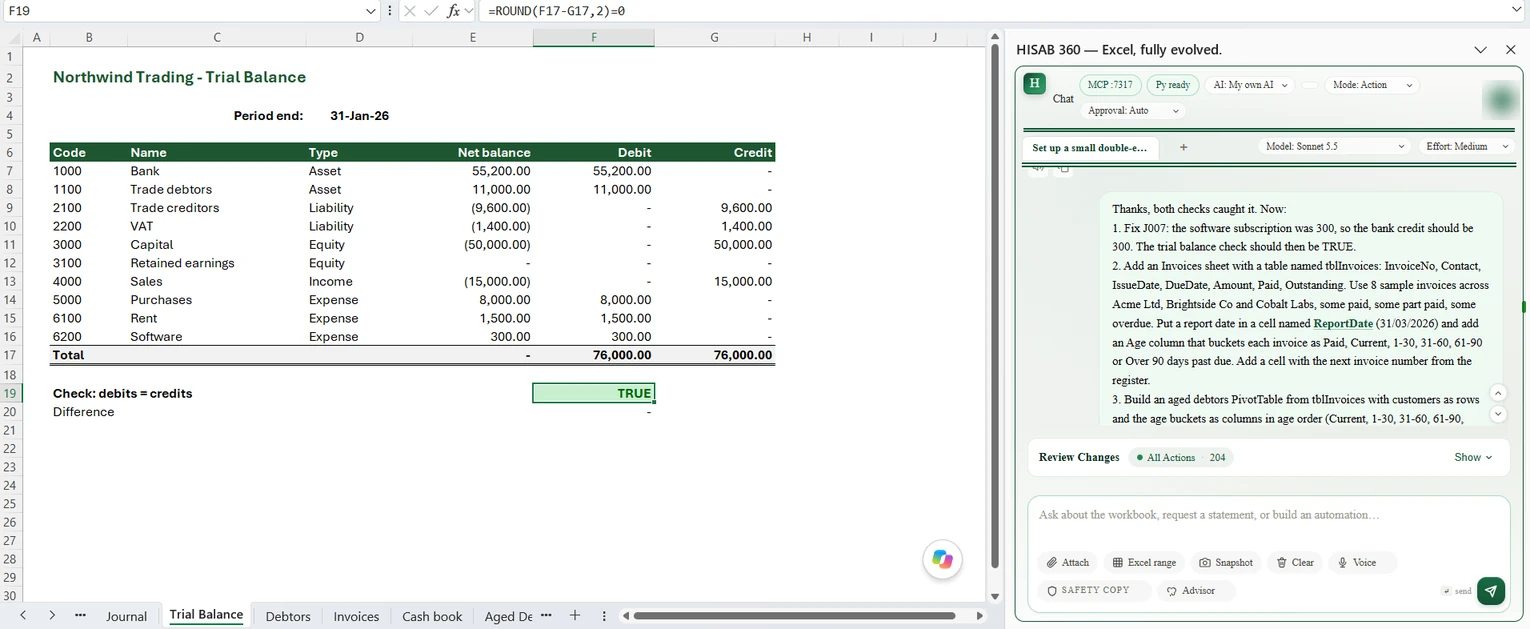
The limits:
- It is not a ledger. It does not add audit trails, period locks or bank feeds to a workbook; those stay in your accounting system.
- It does not file VAT or MTD returns and is not bridging software.
- Pulled data lands as values. There is no live refresh; you re-run the request or a saved automation.
- There is no automatic undo of posted entries. Reversals are manual: a void or delete action (staged from Excel or done in the ledger) or a reversing journal.
- Windows desktop Excel only: no Mac, no Excel for the web. QuickBooks, Xero, Zoho Books and FreshBooks connections need your own developer app credentials; Odoo connects with its URL, database name, username and password.
Not for: a business whose books live only in Excel and intends to keep it that way. For those, the formulas and templates above are the right tools.