Xero to Excel: How to Export Reports, Pull Data With the Xero API and Post Back From Excel
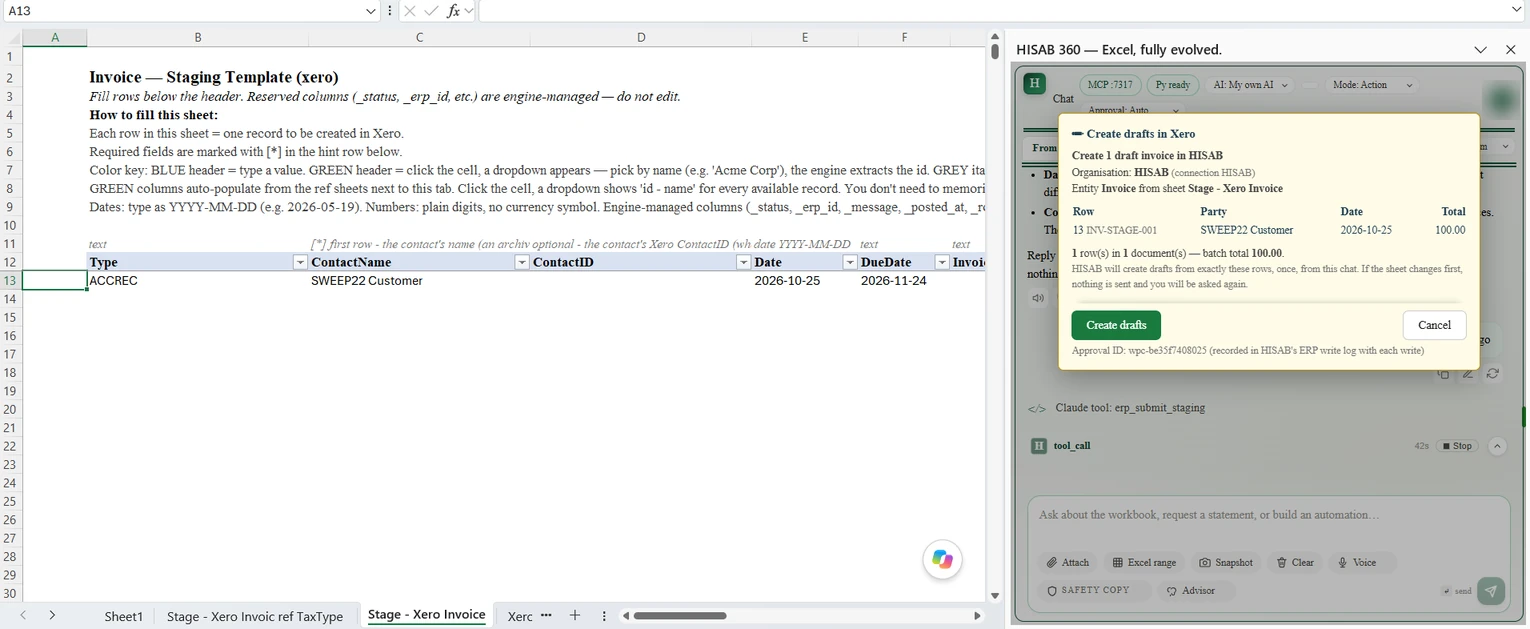
Tested in Excel. On 25 October 2026 we ran this guide against a Xero sandbox organisation from Excel for Microsoft 365 on Windows. The Power Query script below, with its placeholders left in, prompted for Anonymous access as described and then reached Xero's Invoices endpoint, which refused the placeholder token, so the request itself is built correctly. HISAB 360 1.0.17 pulled 163 invoices and bills over two pages of 100, and a draft invoice submitted from a staging sheet showed an approval card and wrote the Xero ID back. We did not use the Xero screens for exports or imports, which need a Xero sign-in; those steps follow Xero Central, re-checked the same day. The screenshot is from the test (select it to see it full size).
Getting Xero to Excel is easy for one report and fiddly for almost everything else. Invoice exports stop at 500 transactions, the Xero API has daily call limits and new paid tiers, and since 2026 the full journal stream is a premium endpoint. Here are the main routes, free ones first, with the limits that decide between them.
Last checked: 25 October 2026. We make one of the routes, HISAB 360, so it comes near the end with its limits spelt out.
How do I connect Xero to Excel? The short answer
Excel's Get Data (Power Query) has no Xero connector, so you export from Xero, use an app or connector, call the Xero API, or use a two-way add-in. If your organisation has Microsoft 365 Copilot, Copilot in Excel can also answer questions from Xero data through Microsoft's Xero connector once an admin turns it on. The free routes are Xero's own exports and CSV imports, plus the API on Xero's no-fee Starter tier.
| Route | Direction | Cost | Refresh | Main limit |
|---|---|---|---|---|
| Report export (PDF, Excel, Google Sheets) | Xero to Excel | Included in Xero | Export again | One formatted report at a time |
| List exports (invoices, bills, contacts, accounts) | Xero to Excel | Included | Export again | Invoices and bills: CSV, 500 per export |
| General ledger export | Xero to Excel | Included | Export again | Administrator role; format set by the target product |
| Xero App Store Excel apps | Mostly Xero to Excel | App subscription | Varies by app | A third party holds a connection to your organisation |
| Third-party two-way connectors (for example CData) | Both | Subscription or limited free plan | Refresh from Excel | A third party holds the connection; check which platforms it covers |
| Xero API with Power Query | Xero to Excel | Free on Xero's Starter developer tier | Manual; tokens last 30 minutes | Developer setup; 1,000 calls a day; Journals is premium |
| CSV import templates | Excel to Xero | Included | Not applicable | Invoices, bills and journals arrive as drafts; about 500 items per file; 300 lines per journal file |
| HISAB 360 (two-way add-in) | Both | Paid add-in; 15-day full trial, no card required | Re-run on request | Windows desktop Excel only; your own Xero app; no Journals stream |
How do I export from Xero to Excel?
In the Reporting menu select All reports, open the report, click Export and choose Microsoft Excel, per Xero Central's export and print article.
- Role: you need administrator, standard + reports or viewer.
- Amounts showing 0.00: a report containing a formula can show some zeros until you click Enable Editing in Excel.
- Layout: the file keeps headings, subtotals and blank rows. Fine for filing, awkward as a source for pivots and lookups.
Which Xero reports should you export for a backup or at year end?
Xero's guide to exporting data says you are responsible for your own backups and recommends these reports:
- Balance Sheet and Profit and Loss for each year
- Trial Balance, including past periods
- Account Transactions (if you use multicurrency, with all columns including FX)
- Receivable Invoice Detail and Payable Invoice Detail
- Tax returns for each filed period
- Fixed Asset Reconciliation
- Inventory Item List
- Bank Reconciliation
How do I extract transactional data from Xero?
Export each list from its own screen, and use the Account Transactions report or the general ledger export for everything posted.
- Invoices and bills. Sales > Invoices > Export, or Purchases > Bills > menu beside New Bill > Export bills. Per Xero's export article, the CSV includes credit notes, prepayments and overpayments, with one row per line item. Each export stops at 500 transactions, so batch larger histories by status or date. Repeating templates cannot be exported.
- Chart of accounts, contacts, fixed assets, inventory items: CSV or XLS exports from each area.
- General ledger. Accounting > Accounting settings > Export accounting data, administrator role only. You pick a target product (CaseWare, IRIS and others, each with its own format) and a date range, per Xero's ledger export article.
- Bank transactions and statement lines. Run Account Transactions for the bank account, or export the Bank Reconciliation report. For imported statement lines not yet reconciled, go to Bank accounts, open the menu and choose Uncoded statement lines, then export to PDF or CSV (administrator role), per Xero's uncoded statement lines article. To match lines against a statement, see our bank reconciliation walkthrough.
Xero Excel integrations on the Xero App Store
The Xero App Store's Excel integrations collection includes reporting add-ins such as Scott's Add-ins and XPNA, and data feeds such as OdataLink and SyncHub. We have not tested them, so ask each one: does it write back or only read, does it refresh on a schedule, does it run on Mac and the web, and how is it priced per organisation?
Outside that collection, CData sells a Xero add-in for Excel that it describes as two-way and available for Excel on Windows, Mac and the web.
Xero's Microsoft 365 route. On 1 July 2026 Xero announced a Microsoft 365 integration that puts its JAX agent inside Microsoft 365 Copilot; at launch, JAX there reads Xero data but does not change it. Microsoft now also lists Xero among its federated Copilot connectors, which Copilot in Excel can use for people with a Microsoft 365 Copilot licence once an admin enables the connector. For AI chat routes, see our MCP options comparison, which covers Xero.
Can you connect Xero to Excel with the Xero API and Power Query?
Yes, but you build it yourself. Microsoft's Power Query connector list has no Xero connector, so you call the Xero Accounting API with Web.Contents.
- Create a developer app. There is no simple Xero API key: you register an app at developer.xero.com and follow the Xero API documentation for OAuth 2.0, using a client secret or PKCE for desktop apps. Test against Xero's demo company, as its getting started guide suggests.
- Choose scopes. Request
accounting.invoices.read(new apps use granular scopes) plusoffline_accessfor a refresh token. - Get your first token outside Excel. Power Query cannot run Xero's sign-in, so use Xero's Postman collection, which walks you through getting an access token and your tenant ID from
GET https://api.xero.com/connections. Access tokens expire after 30 minutes; refresh tokens last 60 days, and each refresh returns a new one to save. - Send three headers on each call:
Authorization: Bearerplus the token,xero-tenant-id, andAccept: application/json.
This query pulls every invoice and bill into a table. Paste it into Data > Get Data > From Other Sources > Blank Query > Advanced Editor and replace the two placeholders. If Excel asks how to connect, choose Anonymous: the token travels in the header.
let
    AccessToken = "PASTE-ACCESS-TOKEN",
    TenantId = "PASTE-TENANT-ID",
    GetPage = (pageNumber as number) as list =>
        let
            Response = Json.Document(
                Web.Contents(
                    "https://api.xero.com/api.xro/2.0/",
                    [
                        RelativePath = "Invoices",
                        Query = [page = Number.ToText(pageNumber)],
                        Headers = [
                            Authorization = "Bearer " & AccessToken,
                            #"xero-tenant-id" = TenantId,
                            Accept = "application/json"
                        ]
                    ]
                )
            )
        in
            Response[Invoices],
    Pages = List.Generate(
        () => [PageNumber = 1, Rows = GetPage(1)],
        each List.Count([Rows]) > 0,
        each [PageNumber = [PageNumber] + 1, Rows = GetPage([PageNumber] + 1)],
        each [Rows]
    ),
    AllInvoices = List.Combine(Pages),
    ColumnNames = List.Distinct(List.Combine(List.Transform(AllInvoices, Record.FieldNames))),
    Invoices = Table.FromRecords(AllInvoices, ColumnNames, MissingField.UseNull)
in
    Invoices
It requests page after page until one comes back empty, and collects column names from every invoice because Xero leaves empty fields out. The Invoices endpoint returns 100 per page with line items included (pageSize changes that). Sales invoices and bills share the endpoint and are told apart by the Type column (ACCREC or ACCPAY); expand LineItems and Contact in the editor. For dates, set DateString and DueDateString to type Date: Date and DueDate arrive as /Date(...)/ text.
Treat it as a one-off pull. Power Query cannot store Xero's rotating refresh token, so next month you fetch and paste a fresh token. Never save a live token in a shared workbook.
VBA instead of Power Query. A macro can call the same API, but you write the sign-in, token refresh, JSON parsing and paging yourself, and VBA does not run in Excel for the web.
Reports through the API. The Reports endpoints cover Profit and Loss, Balance Sheet, Trial Balance, aged reports by contact and a few summaries, but no General Ledger or Account Transactions report.
Xero API limits and pricing tiers in 2026
Xero limits calls per organisation and per app. Figures from its API limits page and developer pricing page:
| Limit | Value |
|---|---|
| Calls in progress at once, per organisation | 5 |
| Calls per minute, per organisation | 60 |
| Calls per day, per organisation | 1,000 on Starter; 5,000 on Core and above |
| Calls per minute, per app across all organisations | 10,000 |
| Maximum request size | 10 MB (Xero suggests batches of about 50 elements) |
| Connected organisations per app | Starter 5, Core 50, Plus 1,000, Advanced 10,000, Enterprise unlimited |
| Uncertified apps per organisation or practice | 5 |
| Journals endpoint | Advanced tier and above, after security assessment and use-case approval |
Hitting a limit returns HTTP 429 with an X-Rate-Limit-Problem header, plus Retry-After (in seconds) for the minute and daily limits.
Tiers. The tier model took effect on 2 March 2026. New apps start on Starter, with no fee. Monthly fees are listed in Australian dollars, tax exclusive: Core A$35, Plus A$245, Advanced A$1,445, Enterprise on application. Paid tiers need a payment method and include a monthly allowance of data downloaded through the API (10 GB on Core), with extra usage charged per GB; some tiers also need app certification.
For Excel users: pulling one organisation's data fits within Starter, but a practice connecting more than five client organisations to one app needs Core. Filter large pulls by date to stay under 60 calls a minute.
The Xero Journals change: what happened in 2026
The Journals endpoint returns every journal Xero posts, including those created from invoices, bills and payments. It is the API's closest thing to a general ledger feed, and it is now hard to reach. Manual journals have their own scopes and are not affected.
- Premium only. It needs a security assessment (initial and annual), use-case approval and the Advanced tier.
- Granular scopes. Apps created on or after 2 March 2026 use granular scopes; existing broad-scope apps and connections keep working until September 2027, per the granular scopes FAQ.
- 29 April 2026. Xero's Custom Connections page says new custom connections no longer get the
accounting.journals.readscope.
How do I import invoices, bills and bank statements into Xero from Excel?
Fill in Xero's CSV template, save it as CSV and import it on the matching screen.
| Import | Where in Xero | Required fields | File guidance | Lands as |
|---|---|---|---|---|
| Sales invoices | Sales > Invoices > Import | ContactName, InvoiceNumber | No more than 500 items | Draft |
| Bills and credit notes | Purchases > Bills > New bill > Import from CSV | Contact Name | Split above 500 items | Draft |
| Manual journals | Accounting > Manual journals > Import | Narration, Date, Amount | Up to 300 lines | Draft |
| Bank statement (CSV) | Bank accounts > Import a Statement | Date, Amount | Up to 100,000 rows | Statement lines |
Import invoices into Xero
Download the template from the Import screen and keep its column headings. Each row is one line; repeat the invoice number for multi-line invoices, and numbers already in Xero are skipped. Dates follow your region's template: DD/MM/YYYY in Xero's Australian invoice import article and MM/DD/YYYY in the US one. Account codes and tax rate names must match Xero exactly, and amounts must be all tax-inclusive or all tax-exclusive.
Import bills and credit notes into Xero
Xero's bills import article says to enter credit notes as negative unit amounts and give each bill its own Invoice Number reference: rows sharing a reference are combined into one bill, even across contacts. You can drag and drop the file onto the import screen.
Import manual journals into Xero
Debits are positive and credits negative, and a row with blank date and narration joins the journal above. Tax rates can be left blank on import but are needed to post. With multicurrency, manual journals are base currency only, per Xero's manual journals article.
Import a bank statement into Xero
Go to Bank accounts, open the account's menu and choose Import a Statement (administrator or standard + bank accounts role). Xero's CSV statement article prefers OFX, QFX or QuickBooks files where your bank offers them. In a CSV, put income as positive and spending as negative in one Amount column, and delete balance columns, the account number and empty rows. Transactions matching ones already in Xero are skipped as duplicates.
One Excel trap: open the saved CSV in a text editor before importing, because Excel can rewrite dates in your PC's regional format when it saves.
How HISAB 360 handles Xero and Excel
HISAB 360 is an AI assistant add-in for Windows desktop Excel. For Xero it pulls data into worksheet cells and posts records from a staging sheet in your workbook, writing Xero's result back to each row.
Connecting. You create your own Xero developer app, add HISAB's localhost callback address as its redirect URI, enter the app's client ID (with a client secret, or PKCE without one) and authorise in your browser. Connections are read-only until you switch them to Read + Write. See the ERP connectors docs.
Reading. The AI fetches invoices, bills, credit notes, payments, bank transactions, contacts, items, accounts, manual journals, budgets and more, paging through Xero's 100-row responses. Reports include Profit and Loss, Balance Sheet, Trial Balance, Bank Summary and Executive Summary; aged reports come per contact, as the API provides them. Data lands as values, with no scheduled refresh: you re-run a saved automation, or make a total drillable so a double-click re-queries Xero.
Writing. Staging rows are validated, then submitted; the Xero ID, status and message come back to each row, and re-runs skip rows already posted. Duplicate submits are suppressed, writes for a record type pause after three failures in a row (rate-limit errors don't count) until 10 minutes pass or you click Reset writes on the connection, and each write attempt is logged locally as a hash of the request and response, not the data itself. It creates invoices, bills, credit notes, manual journals, bank transactions, payments, contacts and more, and can update, void, delete, authorise or approve existing records and attach files.
Every write needs a click on a confirmation card, even when HISAB's approvals are set to Auto:
- drafts and master data such as contacts, items and accounts (a draft batch shows a "Create drafts in Xero" card);
- posted submits, which payments and bank transactions always use, and every update, void, delete, authorise or approve action;
- file attachments and credit applications, which get their own card. A saved automation that writes shows one card each time it runs. Expense claims are submitted to Xero for approval, and only on a connection that opts in to Xero's retired classic expenses scope.
You can limit each connection to the record types it may write.
The limits, plainly:
- No Journals stream. HISAB does not request Xero's
accounting.journals.readscope, and Xero now limits its Journals endpoint to Advanced-tier apps that pass a security assessment, so HISAB cannot read Xero's Journals and has no general-ledger-detail route. Manual journals are still readable. - Xero's limits apply to your app: a new app starts on Starter, with 1,000 calls a day per organisation. HISAB spaces out its calls and, after a rate-limit error, waits and retries for up to about five minutes; if Xero's daily limit is reached, it stops the batch and reports which rows were posted. Split very large pulls.
- No bank statement lines from Xero's bank feeds, and no automatic rollback: reverse with a void, delete or counter-entry.
- Windows desktop Excel only: not Mac, Excel for the web or Google Sheets.
Good for: accountants who prepare invoice, bill or journal batches in Excel and want row-by-row results, or who pull Xero data into reconciliations. Not for: Mac or browser users, hands-off scheduled reporting, or anyone needing Xero's full journal stream. For wider context, see ERP and Excel integration and connecting QuickBooks to Excel and writing data back.
Which Xero to Excel route should you pick?
- A report, backup or migration: Xero's exports.
- Refreshing management reports: an App Store reporting app.
- A one-off analyst pull: the API with Power Query.
- Occasional import batches: Xero's free CSV templates.
- Regular two-way work with results per row: a two-way add-in or connector (HISAB 360 if you work in Windows desktop Excel).
Xero is a trademark of Xero Limited. HISAB 360 is not affiliated with or endorsed by Xero.