Rubberduck VBA in 2026: Archived Status, MZ-Tools and Other Alternatives Compared
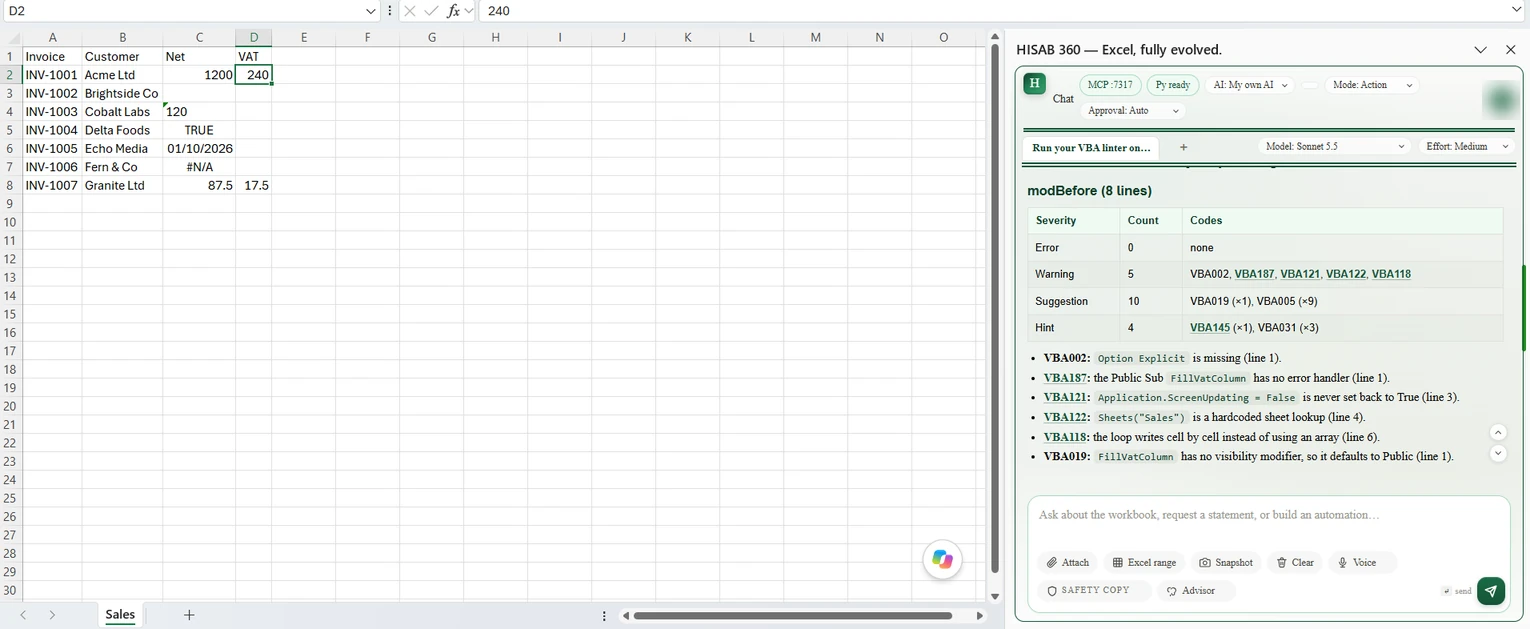
Tested in Excel. On 24 October 2026 we ran both versions of the VAT macro on this page in Excel for Microsoft 365 on Windows and put them through HISAB 360's linter (version 1.0.17); the results below are from that run. Rubberduck and MZ-Tools facts were re-checked against their own pages the same day; we did not reinstall either tool for this update. The screenshots are from the test (select one to see it full size).
Rubberduck VBA is the free, open-source add-in that gave the VBA editor code inspections, refactoring and unit tests. Its GitHub repository was archived in March 2026, so it no longer gets fixes. Here is what that means for your macros, and how MZ-Tools, the editor's own checks and HISAB 360's VBA linter compare.
Last checked: 24 October 2026. We make HISAB 360, so it comes last, with its limits spelt out. Neither Rubberduck nor MZ-Tools is affiliated with or endorses HISAB 360.
The short answer
- Rubberduck can still be installed from GitHub, but it is no longer developed, and the maintainer says its inspection-help links no longer work because the project website is offline. The last stable release is v2.5.91 (27 November 2023). If it runs well for you, there is no need to remove it yet.
- MZ-Tools 8.0 is the maintained commercial add-in for the VBA editor: USD 79.95 per developer, perpetual, with a 30-day full trial. It is strongest on templates, error handlers and documentation.
- The VBA editor itself has syntax checking, Option Explicit enforcement and a compile command.
- HISAB 360's VBA linter runs about 140 inspections (Rubberduck 2.5.91 has 118; the counts aren't like for like) and automatically checks each procedure HISAB's AI writes or replaces. It has no quick fixes, refactoring menu or unit-test framework, works only in Windows desktop Excel, and is part of a paid add-in.
What is Rubberduck VBA?
Rubberduck is a free COM add-in for the VBA editor (the VBA IDE, or VBE) and VB6, licensed under GPLv3 (README). The name comes from "rubber duck debugging": explaining your code to a toy duck until the bug becomes obvious. Its main features, per the Features wiki and source:
- Code inspections: 118 in v2.5.91 and 121 in the 2.5.92 pre-release, per the maintainer's January 2025 count (one of the three new ones was later dropped), each settable from Do Not Show to Error.
- Quick fixes: dozens, applied to one result, a module or the whole project. The Code Inspections wiki warns some can leave code that won't compile.
- Refactorings: Rename, Extract Method, Extract Interface, Encapsulate Field, Reorder and Remove Parameters, and more (refactorings source).
- Unit testing: a test runner with an Assert class and Fakes, so code that calls MsgBox can be tested without a dialog.
- Navigation and tidying: Code Explorer, TODO Explorer, Smart Indenter and code metrics.
Rubberduck has no AI code generation.
Is Rubberduck VBA still maintained?
No. The Rubberduck repository was archived on 8 March 2026 and is now read-only. In a post the same day, the maintainer said the version 3 rewrite had failed because it was too ambitious for a weekend open-source project, and that Rubberduck will stay free and open source. The release history shows:
- Last stable release: v2.5.91 (build 6316), 27 November 2023.
- Last build of any kind: pre-release v2.5.92.6381, 25 June 2025. It never became stable.
What about RDCore?
The maintainer's new project, RDCore, is a VBA language platform whose documentation states it is not an add-in for the VBA editor. The 15 September 2026 status post reports a working parser and name-and-scope symbol resolution, and a 28 September post shows an early interpreter running in a console test program. Neither gives a release date or a download; a June 2026 post told readers not to look for an installer yet. You can't install it into Excel today.
What the archive means in practice
- Existing installs keep working until a Windows, Office or .NET change breaks them.
- Nothing will be fixed. issue #4905, opened in 2019 and still open at archive, reports that on an older build, reparsing an 800 KB+ Excel add-in took 45 to 60 seconds and froze Excel.
- IT sign-off may get harder. If your organisation reviews unsupported software, expect questions about a tool that gets no security or compatibility fixes.
Rubberduck VBA download: where to get it safely
Download it only from the GitHub releases page, not mirror sites. The v2.5.91 release includes Rubberduck.Setup.2.5.9.6316.exe and a SHA-256 hash file for checking the download. Per the Installing wiki, it needs .NET Framework 4.6 and officially supports Office 2000 or later. Installing for yourself needs no admin rights; installing for all users does.
How to use Rubberduck after installing
- Open the VBA editor (Alt+F11). Rubberduck adds a menu just before Window. The Using Rubberduck guide suggests reviewing its Settings first.
- Run Refresh so it parses your code, and again after editing: inspections don't update as you type, and the guide warns an out-of-date parse can lose recent changes.
- Press Ctrl+Shift+I to open Inspection Results. Set severities in the Code Inspection settings.
- For tests, open Test Explorer, create a test module from its Add menu, and use its Run menu (Unit Testing wiki).
Rubberduck vs MZ-Tools vs the VBA editor vs HISAB 360
Inspection counts are not like for like, because each tool splits its rules differently. Treat them as a rough guide to breadth, not quality.
| Feature | Rubberduck 2.5.91 | MZ-Tools 8.0 | VBA editor (built in) | HISAB 360 VBA linter |
|---|---|---|---|---|
| Inspections | 118 (121 in the 2.5.92 pre-release) | Review Quality: dead code, naming and programming rules (no published count) | None; per-line syntax check and Compile | About 140 (version 1.0.17) |
| Quick fixes | Yes: per result, module or project | None listed | No | No. It reports; HISAB's AI rewrites |
| Refactorings | Many (rename, extract method, encapsulate field and more) | A few (e.g. convert field to property, sort code elements) | No | No menu; the AI can rename a procedure across modules and rewrite code on request |
| Unit testing | Yes: test runner, Assert, Fakes | None listed | No | No framework; optional sandbox smoke tests on a temporary copy of the workbook |
| Hosts | Office VBA editor (officially Office 2000+) and VB6 | Office 2013 to 2024 and Office 365 (32/64-bit), hosts such as AutoCAD, VB6, Visual Studio | Every desktop VBA host | Windows desktop Excel only |
| Maintenance | Archived 8 March 2026; last stable release November 2023 | Maintained; build 8.0.3.4574, 19 May 2026 | Part of Office | Part of HISAB 360, which is actively developed (changelog) |
| Price / licence | Free, GPLv3 | USD 79.95 per developer, perpetual; team packs; 30-day full trial | Included with desktop Office | Part of a paid add-in (pricing); 15-day trial |
| AI code generation | No | No AI features listed | No | Yes: standard and class modules, procedures and UserForms (form controls are created in code at load time, not in the form designer) |
| Gate on AI-written code | Not applicable | Not applicable | Not applicable | For procedures the AI writes or replaces: Error-level findings undo the change |
MZ-Tools for VBA: features, price and licence
MZ-Tools is a commercial add-in for the VBA editor, VB6 and Visual Studio. Its homepage lists Office 2013 to 2024 and Office 365 (32-bit and 64-bit), plus VBA in programs such as AutoCAD and SolidWorks. The version history lists build 8.0.3.4574 on 19 May 2026. The features page includes:
- Review Quality: dead code, naming rules, programming rules, indentation and TabIndex reviews.
- Templates: insert a standard error handler or procedure header from your own template.
- Line numbers: add or remove them so
Erlcan report which line failed. - Navigation and documentation: method callers, better find and replace, HTML or XML documentation, and code statistics.
It lists no unit testing, rename refactoring or AI features. Older versions such as MZ-Tools 3.0 are superseded; 8.0 offers to import their options when it first loads.
How much does MZ-Tools cost?
Per the purchase page: USD 79.95 for one developer, with packs from 219.95 (three developers) to 2,999.95 (worldwide), plus taxes such as EU VAT. The licence is perpetual, with free minor updates until the next major version, email support with no support fees, and a 30-day money-back guarantee. The trial download is the full product for 30 days, with no registration. Avoid unlicensed "free" copies on a finance PC.
Does the VBA editor have a built-in code checker?
Only a basic one: there is no linter, but two settings on Microsoft's environment options page (Tools > Options) and one menu command catch simple mistakes:
- Require Variable Declaration. New modules start with
Option Explicit, so a mistyped variable name becomes a compile error instead of a silent new variable. Add the line to existing modules yourself. - Auto Syntax Check. Checks each line's syntax as you enter it.
- Debug > Compile. The Compile command compiles your project. Run it before sharing a file: with Compile On Demand ticked, code is compiled only as it is needed, so an error in a rarely used module can stay hidden until someone runs it.
None of these catch code that compiles but is risky, such as a macro that depends on whichever sheet is active. If a macro has already broken, see why an Excel macro is not working.
What a VBA code analyser flags: a before-and-after example
This example shows common VBA best practices. This macro adds 20% VAT in column D of a Sales sheet. It works, but an analyser would flag it:
Sub FillVatColumn()
    Dim i As Integer
    Application.ScreenUpdating = False
    Sheets("Sales").Select
    For i = 2 To Range("A" & Rows.Count).End(xlUp).Row
        Cells(i, 4).Value = Cells(i, 3).Value * 0.2
    Next i
End Sub- No
Option Explicit. Integerfor the row counter, which tops out at 32,767 per Microsoft's data type summary.- Unqualified
RangeandCells, which act on whatever sheet is active, plusSelect. - Writing one cell at a time in a loop.
- Screen updating is switched off and never explicitly restored, and there is no error handling.
Rubberduck's inspection source includes checks for missing Option Explicit, the Integer type and implicit ActiveSheet references.
What HISAB's linter reported. On 24 October 2026 we ran this exact macro through the linter in HISAB 360 1.0.17. It returned 19 findings and no errors: 5 warnings (no Option Explicit, no error handling in a public macro that changes the workbook, a hard-coded "Sales" sheet lookup with no guard, screen updating never turned back on, and one cell written per pass of the loop), 10 suggestions (mostly unqualified Sheets, Range, Rows and Cells) and 4 hints (Integer instead of Long, and three unnamed numbers). It did not flag the Select line. In version 1.0.13 the error-handler and sheet-lookup findings were errors; they are now warnings. The safer version below came back with no errors or warnings and two hints: a public procedure nothing else calls, and two variables declared on one line. A safer version:
Option Explicit

Public Sub FillVatColumn()
    Const VAT_RATE As Double = 0.2
    Dim ws As Worksheet
    Dim lastRow As Long, r As Long
    Dim netValues As Variant
    Dim vatValues() As Variant

    On Error GoTo CleanFail
    Application.ScreenUpdating = False
    Set ws = ThisWorkbook.Worksheets("Sales")
    lastRow = ws.Cells(ws.Rows.Count, "A").End(xlUp).Row
    If lastRow < 2 Then GoTo CleanExit

    If lastRow = 2 Then
        ReDim netValues(1 To 1, 1 To 1)
        netValues(1, 1) = ws.Range("C2").Value
    Else
        netValues = ws.Range("C2:C" & lastRow).Value
    End If
    ReDim vatValues(1 To UBound(netValues, 1), 1 To 1)
    For r = 1 To UBound(netValues, 1)
        Select Case VarType(netValues(r, 1))
            Case vbDouble, vbCurrency
                vatValues(r, 1) = netValues(r, 1) * VAT_RATE
        End Select
    Next r
    ws.Range("D2:D" & lastRow).Value = vatValues

CleanExit:
    Application.ScreenUpdating = True
    Exit Sub
CleanFail:
    MsgBox "Could not fill the VAT column: " & Err.Description, vbExclamation
    Resume CleanExit
End Sub
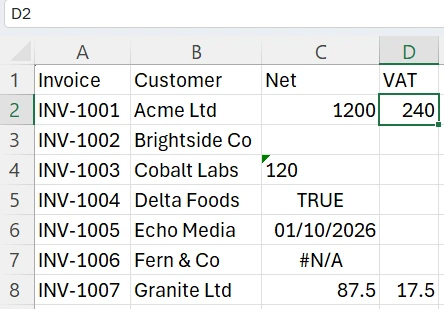
Change the sheet name and columns to match your file. Column C is read into an array and column D written in one step, faster on long ledgers. Only real numbers get VAT: blanks, text (including numbers stored as text), TRUE/FALSE, dates and error values get a blank cell. Don't paste both versions into one module: two Subs with the same name won't compile.
Other VBA code analysers, free and paid
- vba-lint-mcp: an independent GPLv3 project, derived from Rubberduck's code, that ports 65 of its inspections to run on exported
.bas,.clsand.frmfiles without Excel, as an MCP server for AI tools. - VBA-Linter: a free, MIT-licensed Python tool that checks exported VBA for parsing and formatting problems; many rules are still to do.
- Aivosto Project Analyzer (paid): an analyser for VB6 and VB.NET, with an add-on for Office VBA. Its demo handles up to 10 source files.
- Online "VBA code checkers": websites where you paste code for an AI to review. They can explain code, but aren't rule-based analysers and can't see your workbook, references or other modules. Strip file paths, server names and credentials before pasting.
How HISAB 360's VBA linter compares
HISAB 360 is an AI assistant add-in for Windows desktop Excel with its own VBA static analyser, written in C#; it does not use Rubberduck's code. There is no inspections window in the VBA editor. HISAB's AI runs the linter when you ask it to check macros, and automatically when it writes or replaces a procedure.
What it checks
- Breadth. About 140 inspections, most of them per module and a few across the whole project. Rubberduck 2.5.91 has 118, but the tools count rules differently.
- Excel runtime risks.
Selectpatterns, implicit ActiveSheet, cell-by-cell writes in loops, Application settings never restored, uncheckedFind/Matchresults,Workbooks.Openwith no Close, and deleting items while looping over them. - Object-model checks. It warns about members that don't exist, such as a misspelt Range property, on about 100 common types from the Excel object model, ADODB, Scripting and MSForms, plus members from the type libraries your workbook references. Types outside that catalogue, and most late-bound
ObjectorVariantcode, go unchecked. - UserForm checks. On forms whose controls are created in code (as HISAB builds them), it flags control names never created, incomplete WithEvents wiring (a button that never fires), overlapping or clipped controls and a missing Default button. Forms laid out by hand in the form designer give these checks little to go on.
- Project-wide checks. Undefined references across modules,
Application.Runcalls to missing procedures, andImplementscontracts not fully met. - A gate on AI-written code. When the AI writes or replaces a procedure, the whole project is linted. Any Error-level finding (or a linter crash) undoes the change, apart from an Option Explicit line HISAB may have added, and sends the findings back to the AI. Warnings don't block. Form templates, imported modules, helper libraries, renames and re-indents are written without the gate. An
'@Ignoreannotation naming a finding code suppresses it, even at the gate.
What it does not do
- No quick fixes, refactoring menu, unit-test framework or Code Explorer. The AI can rename a procedure across modules and re-indent a module when asked, but there is no Extract Method or Encapsulate Field, so it doesn't replace Rubberduck's refactorings or tests.
- Not a compiler. It can miss real compile errors, so still use Debug > Compile. The only real compile check is an optional sandbox test on a temporary copy of the workbook, and that is a probe, not a guaranteed full-project compile. It needs a saved workbook (unsaved changes are saved first), and smoke-test macros run for real, so effects outside the workbook, such as writing files, are not isolated.
- Strict in places. Only Error-level findings block an AI write. In version 1.0.17 a missing error handler and an unguarded sheet lookup are warnings, so they no longer block. A few rules can still block code that would compile — in our test of a UserForm, the standard
Cancel = TrueinsideBeforeUpdatewas reported as an error — so the AI has to rewrite it or add an'@Ignoreannotation. - Code-built forms, step-by-step projects. UserForms it builds create their controls in code at load time, so you won't see them on the VBA editor's design surface. A multi-module project is built step by step in chat, not in one click.
- Windows desktop Excel only. Code must be in a workbook module; you can't paste code in to check it. No Access, Word, VB6, Mac or Excel for the web.
- Permissions. HISAB's macro permissions are off by default. Checking macros needs Inspect (or Run); editing needs Edit and Run and a macro-enabled file (.xlsm, .xlsb, .xlam or .xltm). You must also tick Excel's "Trust access to the VBA project object model", which Microsoft calls a possible security hazard. See HISAB's security model.
Good for: finance teams who want AI to write or repair Excel macros, including modules, UserForms, worksheet buttons and a custom ribbon tab saved as an .xlam add-in (see building VBA macros and a ribbon from chat). Procedures the AI writes or replaces are linted before the change is kept; ask for a full check after it builds a form or imports a module. Not for: developers who want refactorings and unit tests in the editor, Access, Word, VB6 or Mac users, or anyone who needs a free tool.
Which VBA tool should you use?
- You write VBA by hand and Rubberduck works for you: keep 2.5.91 from GitHub, still the strongest free option for refactorings and tests.
- You need a maintained editor add-in for Excel, Access, Word or a CAD program: MZ-Tools 8.0, after the 30-day trial.
- You can't install anything: turn on Require Variable Declaration, add Option Explicit everywhere, and compile before every release.
- You want AI to write or fix macros, with automatic checks on the procedures it writes: HISAB 360, or the free VBA macro generator.
Is VBA still worth learning? Microsoft's comparison page says VBA has more complete Excel feature coverage.